If you run a Shopify or WooCommerce store, you’ve almost certainly heard the same two contradictory takes: “Meta ads are dead, it’s all TikTok now” and “Meta is still the only thing that works, don’t waste money anywhere else.” Both are wrong. Both are also right, depending on your product, your margins, and — more than anything — whether your tracking and creative fundamentals are in place.
This is the guide we keep sending clients who ask us, “Should I run ads myself?” It starts with the boring groundwork most people skip, then walks up to the campaign structures that actually move product in 2026. No jargon theater. No dashboards full of vanity metrics. Just the moves that matter.
🧠 First, a reality check on the numbers
Before you spend a cent, let’s set expectations. Here’s what the 2026 data looks like across ecommerce:
- Average ecommerce ROAS across all platforms: 2.87:1. Median is 2.04:1 — meaning half of all stores generate less than $2 for every $1 spent. (Hawky AI benchmarks)
- Meta (Facebook + Instagram): 2.2x for prospecting, 3.6x for retargeting. Median CPM sits around $13.48, median CPA around $38. (Triple Whale 2026 benchmarks)
- Google Shopping: Median ROAS of ~5.0x — the highest of any major channel, because people searching “buy running shoes size 10” are much closer to pulling out a credit card than people scrolling Reels.
- TikTok: Median ROAS of 1.4x, but with the lowest CPMs (~$3.50). Strong for discovery of visual, impulse-friendly products under $75. Weak for anything over $200.
A 3x ROAS is good for brands with gross margins above 40%, as it comfortably exceeds break-even and provides room for profit. For brands with margins below 30%, a 3x ROAS may not cover costs.
Translation: before you even open Ads Manager, calculate your break-even ROAS.
Break-even ROAS = 1 ÷ (Gross Margin %)
If your margin after COGS, shipping, and payment fees is 30%, your break-even is ~3.33x. Anything below that number is burning money. Anything above it is working.
This single calculation will save you more than any fancy campaign strategy.
🏗️ Step 1: Fix your tracking before you spend a dollar on ads
This is the step 90% of store owners skip, and it’s the reason their ads “don’t work.”
In 2026, iOS privacy restrictions, ad blockers, and consent banners prevent browser-based pixels from seeing over half of real conversions in many stores. That means Meta’s algorithm is making optimization decisions based on incomplete data — and your reported ROAS looks worse than reality.
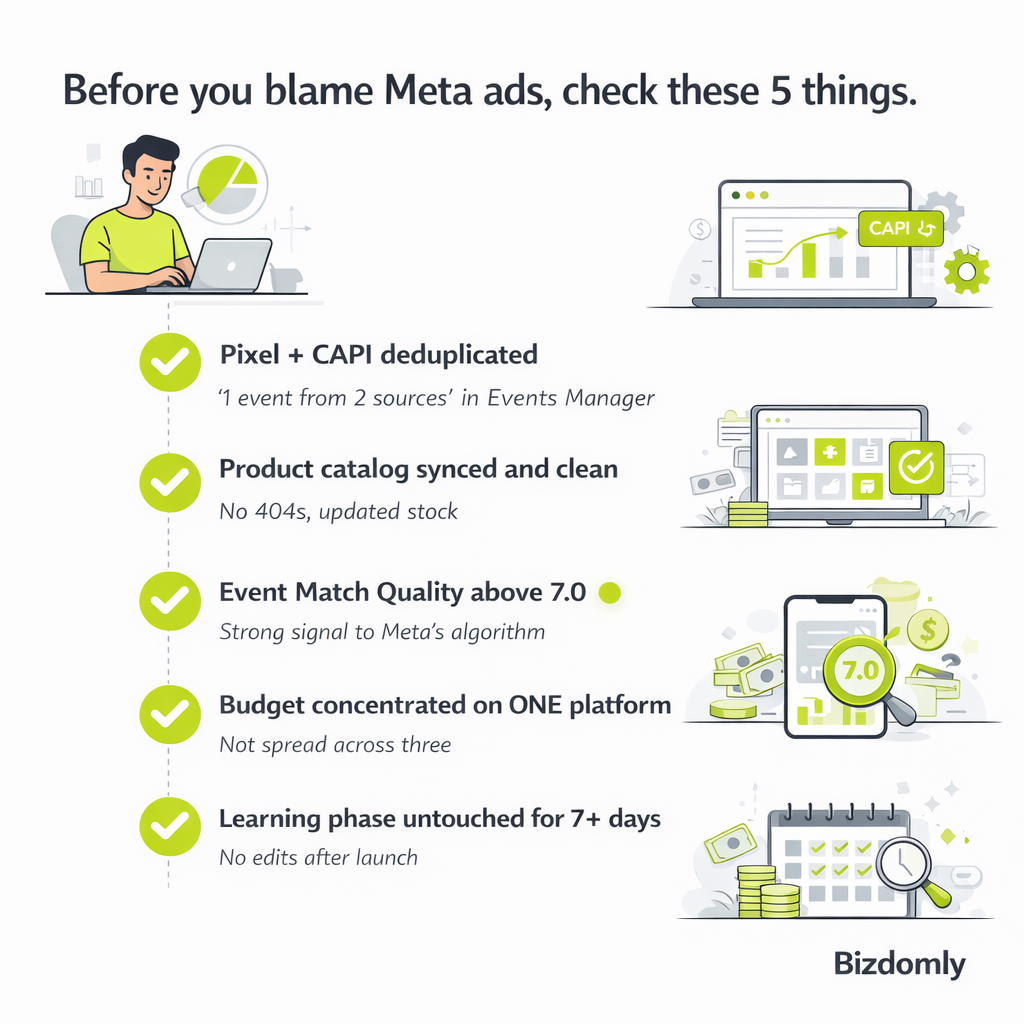
The fix is running Meta Pixel + Conversions API (CAPI) together, with proper deduplication. Advertisers using both Meta Pixel and Conversions API see a 13% improvement in cost per result compared to Pixel alone.
For Shopify stores
Shopify makes this relatively painless:
- Go to Settings → Apps and sales channels → Facebook & Instagram.
- Open the sales channel, navigate to data sharing settings, and connect your Meta account.
- Select or create a Pixel and set data sharing to Maximum — this activates server-side event forwarding.
- Verify inside Meta Events Manager: events should appear labeled “Server” or “Server + Browser.” If you only see “Browser,” CAPI isn’t working.
For WooCommerce stores
Use the official Facebook for WooCommerce plugin. Install, connect your Meta Business account, enable the Conversions API toggle, and paste your access token. Verify with the Meta Pixel Helper Chrome extension and the Events Manager Test Events tab.
What “working” looks like
Inside Events Manager, each core event (ViewContent, AddToCart, InitiateCheckout, Purchase) should show as “1 event from 2 sources.” If it says “1 event from 1 source,” your deduplication is broken and you’re double-counting or losing signal.
Aim for an Event Match Quality (EMQ) score above 7.0. Below that, Meta’s algorithm can’t reliably match your events to users, and your ad delivery suffers.
⚠️ Skip this step at your own risk. Launching ads without proper tracking is like driving at night with the headlights off. You’ll still move — but you won’t know where you’re going until you hit something.
📦 Step 2: Connect your product catalog
The second skipped-but-critical step. Your product catalog is what powers dynamic product ads, Advantage+ Shopping campaigns, and all retargeting that shows users the specific product they viewed.
- Shopify: The Facebook & Instagram sales channel automatically syncs your catalog. Make sure all products have titles, descriptions, clean images, and correct pricing and availability.
- WooCommerce: The Facebook for WooCommerce plugin handles the sync. Double-check that out-of-stock products update in near-real-time — outdated catalogs are a common cause of ads pointing to 404 pages.
A good product feed has: high-quality square images (1080×1080 minimum), descriptions with actual keywords buyers use (not your internal SKU jargon), GTINs where applicable, and accurate shipping information.
🛒 Pro tip: if you have more than 20 SKUs, segment them into product sets — your bestsellers, your new arrivals, your clearance items. This lets you run targeted catalog campaigns without building creative for every product individually.
🎯 Step 3: Start with one platform. One.
The biggest mistake small stores make is running three platforms at $20/day each and getting zero signal on any of them.
Pick the platform that matches your product:
| Product type | Start here | Why |
|---|---|---|
| Visual, impulse-buy, under $75 (beauty, apparel, accessories) | Meta (Instagram priority) or TikTok | Creative-driven discovery, fast feedback |
| High-intent, searched-for products (tools, replacement parts, niche gear) | Google Shopping | Captures buyers at the moment of intent — 5x median ROAS |
| Home, decor, DIY, food, fashion with strong visuals | Pinterest + Meta | Pinterest users plan purchases; ROAS is underrated |
| B2B, professional services, high-ticket (>$500) | LinkedIn + Google Search | Social impulse channels don’t justify the CPA |
Focus 100% of your budget on one channel for the first 30–60 days. You need data before you diversify — and you won’t get data by spreading $600/month across three platforms.
🚀 Step 4: Use the right campaign type — and let the algorithm work
In 2026, Meta’s Advantage+ Sales Campaigns (ASC) — renamed from Advantage+ Shopping — are the default for ecommerce. They combine prospecting and retargeting into one AI-driven campaign that tests up to 150 creative combinations automatically.
Brands using Advantage+ Shopping Campaigns report 15-25% higher ROAS than those running manual campaign structures.
When Advantage+ is right for you
- Monthly ad spend above ~$3,000
- At least 50 purchase events per week (the new learning phase threshold)
- Product catalog connected
- Pixel + CAPI properly deduplicated
- At least 10–20 creative assets ready to upload
When to stick with manual campaigns
- You’re brand new with zero conversion data
- Your average order value is above $500 with long consideration cycles
- You’re running lead generation, not ecommerce
- Your monthly budget is under $1,500 (below this, ASC can’t exit the learning phase)
ASC setup essentials
- Daily budget: $100/day minimum, $150–300/day recommended for small stores. Below $50/day the algorithm is starved of data.
- Existing customer budget cap: Set to 25–30%. Without this, ASC will drift toward warm retargeting audiences because they convert easier — and you’ll stop acquiring new customers.
- Attribution window: 7-day click, 1-day view for most ecommerce products.
- Budget increases: Maximum +20% every 3–4 days. Jumping budgets aggressively resets the learning phase.
The golden rule of the learning phase
Do not touch the campaign for 7 days after launch. No creative swaps, no budget changes, no audience tweaks. Every edit restarts Meta’s 50-conversion learning window. The single biggest reason ads “fail” is impatient editing.
🎨 Step 5: Feed the algorithm good creative (this is now where you actually compete)
Here’s what changed in 2026: targeting is largely automated. Creative is where you win or lose.
Volume matters more than perfection
Advertisers who consistently scale Meta ads aren’t producing one perfect ad — they’re producing 10–20 new creative variations per month and letting the algorithm pick winners. Your goal isn’t to guess what works. It’s to ship enough variety that Meta can tell you.
The creative mix that works
- 40% single images — product on clean background, product in use, before/after
- 30% short videos (6–15 seconds) — unboxing, demo, problem→solution, testimonial
- 20% carousels — product details, “3 reasons why,” multi-angle shots
- 10% UGC-style content — raw, phone-shot, creator-driven
What’s working in 2026
- UGC over polished brand creative. Ads that feel like organic content outperform high-production spots by 2–3x on click-through rate, especially on TikTok and Reels.
- Hook in the first 2 seconds. If your video opens with a logo animation, people are already gone. Open with the problem, the result, or an unexpected visual.
- Captions always on. 85% of social video is watched muted.
- Authenticity beats aesthetics. A $50 phone-shot testimonial often beats a $5,000 studio ad.
Refresh cadence
Replace creative every 2–4 weeks, or sooner if frequency exceeds 3 impressions per user in a 7-day window. Creative fatigue is the #1 silent ROAS killer.
🔁 Step 6: Retargeting is where the money hides
Prospecting ads get people to your store. Retargeting is what actually converts them. Retargeting consistently delivers the highest ROAS of any campaign type — often 2–3x higher than prospecting.
Even if ASC handles some retargeting automatically, dedicate 10–15% of your budget to a separate, urgency-driven retargeting campaign aimed at cart abandoners from the last 1–7 days.
This campaign should include:
- A specific product reminder (dynamic product ads pulling from your catalog)
- Social proof — reviews, ratings, testimonials
- A reason to act now — limited-time discount code, low stock warning, free shipping threshold
- A simple, honest message. “You left this behind” works better than anything clever.
The abandoned cart automation opportunity 🤖
Most stores stop at “send a discount email.” In 2026, you can layer:
- Meta retargeting ad showing the abandoned product (triggers within minutes)
- Email sequence at 1 hour → 24 hours → 72 hours
- SMS reminder at 6 hours (requires opt-in)
- AI-personalized message based on cart value and browse history
This is exactly the kind of multi-channel automation we build for Bizdomly clients using tools like n8n — stitching your store, ad platform, email, and SMS into one coordinated recovery flow. The lift over “just ads” is typically 15–30% additional recovered revenue.
⚠️ Common mistakes that sink new advertisers
Save this list. Read it before you launch. Read it again when something feels off.
- Running ads before tracking is solid. You’re paying Meta to optimize with bad data. The algorithm gets worse, not better.
- Turning off campaigns after 2–3 days. Give every campaign a minimum 7 days before judging. The learning phase is real.
- Spreading budget too thin. $20/day across five ad sets and three platforms teaches Meta nothing. Concentrate.
- Editing during the learning phase. Every change resets the 50-conversion threshold. Let it run.
- Obsessing over in-platform ROAS. Post-iOS 14, Meta underreports true performance by 20–40%. Always cross-reference with blended ROAS (total revenue ÷ total ad spend) from your Shopify or WooCommerce reports.
- Skipping the existing customer budget cap. Without it, you’ll retarget your way to “great ROAS” while acquiring zero new customers.
- Treating TikTok like Instagram. Polished brand content bombs on TikTok. If you can’t commit to native-style creative, skip the platform entirely.
- Ignoring creative refresh. That one ad that crushed for three weeks? It’s now costing you 40% more per click than it did on day 1. Rotate.
🛠️ When to DIY, when to hire, when to automate
DIY is realistic when: you have under $3,000/month in ad spend, you’re willing to learn Meta’s platform over 60–90 days, and your store’s tracking and catalog are already in solid shape.
Hire a specialist when: your spend crosses ~$5,000/month, you have enough conversion volume that bad management costs real money, or your technical stack (custom checkout, headless Shopify, complex WooCommerce subscriptions) needs expertise.
Automate when: you’ve validated what works manually and want to scale the repetitive parts — abandoned cart recovery, dynamic product retargeting, post-purchase cross-sell flows, creative testing workflows. This is where AI and workflow tools like n8n pay for themselves within weeks.
🎁 The honest closing
Social media ads are one of the highest-leverage channels available to a Shopify or WooCommerce store — when the foundations are solid. They’re also one of the fastest ways to set money on fire when they aren’t.
If your tracking is broken, your catalog is dirty, your creative is stale, or your math on margins is fuzzy, no amount of ad spend will rescue you. Fix the fundamentals first. The algorithm can do a lot of things. It can’t do your homework for you.
Bizdomly helps WooCommerce and Shopify store owners build the technical foundation that makes paid ads actually profitable — Pixel + CAPI setup, catalog optimization, abandoned cart automation, and AI-powered workflow integrations. If you’ve been running ads and suspecting the problem is under the hood, it probably is.
📩 Want an honest audit of where your store is losing signal? Reach out — we’ll tell you straight.